
Building a Scalable Product Store Using Onion Architecture with ASP.NET Core


Introduction: A Brief Overview of Onion Architecture
When designing large-scale applications, structuring your code properly becomes critical for scalability, maintainability, and testability. One way to achieve this is by using Onion Architecture, a layered approach that places the core business logic at the center of the application while isolating it from the external infrastructure (such as databases, APIs, or UI).
In this article, we will dive into how I implemented Onion Architecture to build a Product Store using ASP.NET Core. I’ll cover not only the architecture itself but also key patterns like CQRS (Command Query Responsibility Segregation), Dependency Injection, Unit Testing, and how continuous integration and deployment (CI/CD) is set up with GitHub Actions.
By the end, you’ll have a clear understanding of how these architectural patterns contribute to clean, testable, and maintainable code.
Why Use Onion Architecture?
The central idea behind Onion Architecture is to keep the core business logic free from dependencies on external layers like frameworks, databases, or APIs. This gives your application the following benefits:
- Decoupled Architecture: The business logic is independent of infrastructure. You can swap the database, framework, or other external services without impacting core logic.
- Testability: Isolating business logic allows you to write unit tests more easily.
- Separation of Concerns: Each layer has a specific responsibility, which improves maintainability and clarity.
- Flexibility: It’s easy to replace or upgrade external components without affecting the core.
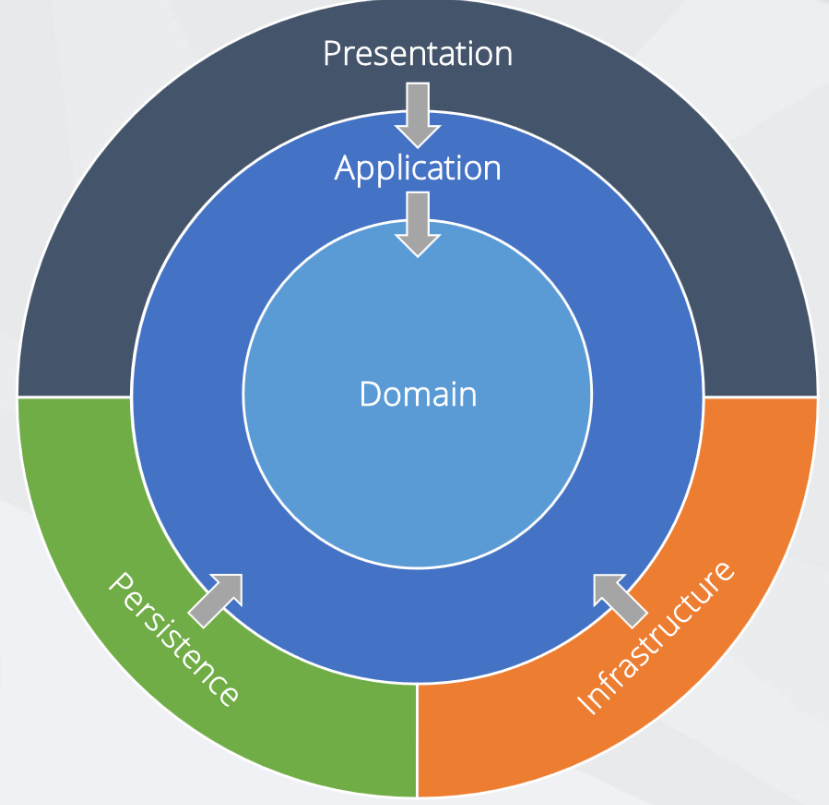
In Onion Architecture, the core layers include:
- Domain (Core Layer) – Holds the core logic, entities, and interfaces.
- Application Layer – Contains the business logic and CQRS patterns.
- Infrastructure Layer – Deals with external dependencies like databases and APIs.
- Presentation Layer – Handles user interface and presentation logic (e.g., ASP.NET Core MVC).
Let’s explore each of these layers as applied to the Product Store.
The Layers of the Product Store
1. Domain (Core) Layer:
At the heart of the Onion Architecture is the Domain Layer. This is the most crucial part of the application and contains the business logic and entities. It is completely independent of any external dependencies, ensuring that your business rules are isolated.
In our Product Store, the domain consists of the Product entity and the interfaces it depends on.
Example of the Product entity:
public class Product
{
    public int Id { get; set; }
    public string Name { get; set; }
    public decimal Price { get; set; }
    public string Category { get; set; }
}
Notice that there are no dependencies on any framework or external libraries. This ensures that the core of our application is highly maintainable and reusable. Additionally, the Domain Layer includes repository interfaces to define operations on entities without specifying the implementation details.
Example of a repository interface:
public interface IProductRepository
{
    Task<Product> GetByIdAsync(int id);
    Task<IEnumerable<Product>> GetAllAsync();
    Task<int> AddAsync(Product product);
    Task<int> UpdateAsync(Product product);
    Task<int> DeleteAsync(int id);
}
By using interfaces here, we make sure that the Infrastructure Layer can later provide specific implementations for these methods.
2. Application Layer:
The Application Layer is where all the business rules are implemented. This layer acts as a bridge between the Domain Layer and the Infrastructure Layer. Here, I implemented the CQRS pattern to handle business logic.
CQRS (Command Query Responsibility Segregation) separates read and write operations into two distinct models. This separation provides better performance and scalability, especially in data-heavy applications. In our Product Store, commands handle actions like creating or updating a product, while queries handle retrieving products.
Commands:
Commands are used to perform write operations. For example, the following command handles adding a product:
public class AddProductCommand : IRequest<int>
{
    public string Name { get; set; }
    public decimal Price { get; set; }
    public string Category { get; set; }
}
We use MediatR, a library that helps implement CQRS by dispatching commands to their respective handlers.
Here’s the handler that processes the command:
public class AddProductHandler : IRequestHandler<AddProductCommand, int>
{
    private readonly IProductRepository _repository;

    public AddProductHandler(IProductRepository repository)
    {
        _repository = repository;
    }

    public async Task<int> Handle(AddProductCommand request, CancellationToken cancellationToken)
    {
        var product = new Product
        {
            Name = request.Name,
            Price = request.Price,
            Category = request.Category
        };

        return await _repository.AddAsync(product);
    }
}
Queries:
Queries, on the other hand, are used to perform read operations. For example, retrieving a list of products:
public class GetProductsQuery : IRequest<IEnumerable<Product>>
{
}

public class GetProductsHandler : IRequestHandler<GetProductsQuery, IEnumerable<Product>>
{
    private readonly IProductRepository _repository;

    public GetProductsHandler(IProductRepository repository)
    {
        _repository = repository;
    }

    public async Task<IEnumerable<Product>> Handle(GetProductsQuery request, CancellationToken cancellationToken)
    {
        return await _repository.GetAllAsync();
    }
}
This separation between commands and queries makes it easy to scale the application and optimize read-heavy operations.
3. Infrastructure Layer:
The Infrastructure Layer implements the repository interfaces defined in the Domain Layer and handles the interaction with external services like the database. In the Product Store, I used Entity Framework Core to manage data persistence. The Repository Pattern is used here to encapsulate the database logic.
Here’s the repository implementation:
public class ProductRepository : IProductRepository
{
    private readonly AppDbContext _context;

    public ProductRepository(AppDbContext context)
    {
        _context = context;
    }

    public async Task<Product> GetByIdAsync(int id)
    {
        return await _context.Products.FindAsync(id);
    }

    public async Task<IEnumerable<Product>> GetAllAsync()
    {
        return await _context.Products.ToListAsync();
    }

    public async Task<int> AddAsync(Product product)
    {
        _context.Products.Add(product);
        return await _context.SaveChangesAsync();
    }

    // Other CRUD operations...
}
By encapsulating database logic inside repositories, the Infrastructure Layer is isolated from the business logic, making the code more flexible and easier to test.
4. Presentation Layer:
The Presentation Layer is the outermost layer, responsible for handling the user interface and presentation logic. In our Product Store, this is implemented using ASP.NET Core MVC, where the controllers interact with the application services.
Example of a controller method for adding a product:
public class ProductsController : Controller
{
    private readonly IMediator _mediator;

    public ProductsController(IMediator mediator)
    {
        _mediator = mediator;
    }

    [HttpPost]
    public async Task<IActionResult> AddProduct(AddProductCommand command)
    {
        var result = await _mediator.Send(command);
        return RedirectToAction("Index");
    }
}
This layer is responsible for displaying data to the user and sending commands to the business logic layer via MediatR.
Unit Testing in the Product Store
Unit testing ensures that our code behaves as expected. For this project, I wrote unit tests for the Application Layer, specifically for the command handlers. These tests help verify the correct behavior of commands and queries, and ensure that changes don’t introduce regressions.
For example, testing the AddProductCommandHandler might look like this:
public class AddProductCommandTests
{
    [Fact]
    public async Task AddProduct_Should_Return_Valid_ProductId()
    {
        // Arrange
        var repositoryMock = new Mock<IProductRepository>();
        var handler = new AddProductHandler(repositoryMock.Object);
        var command = new AddProductCommand { Name = "Test Product", Price = 10.99M };

        // Act
        var result = await handler.Handle(command, CancellationToken.None);

        // Assert
        Assert.True(result > 0);  // Check if the returned product ID is valid
    }
}
In this test, I mocked the IProductRepository to ensure that the test only focuses on the command handler logic without depending on the database. You can find the full test cases for the Product Store in the GitHub repository.
Continuous Integration & Deployment (CI/CD)
To ensure that the code remains clean and error-free after every commit, I implemented a CI/CD pipeline using GitHub Actions. The pipeline runs unit tests and builds the application every time code is pushed to the repository.
The GitHub Actions workflow is defined in the .yml file:
name: .NET Core CI

on:
  push:
    branches:
      - master
  pull_request:
    branches:
      - master

jobs:
  build:
    runs-on: ubuntu-latest
    steps:
    - uses: actions/checkout@v2
    - name: Setup .NET Core
      uses: actions/setup-dotnet@v1
      with:
        dotnet-version: '6.0.x'
    - name: Restore dependencies
      run: dotnet restore
    - name: Build
      run: dotnet build --no-restore
    - name: Run Tests
      run: dotnet test --no-build --verbosity normal
This pipeline ensures that the code is built, tested, and validated before any new changes are merged into the master branch.
Key Design Patterns Used
Several key design patterns are at play in the Product Store:
- Repository Pattern: Encapsulates the data access logic and isolates it from the application logic.
- CQRS Pattern: Separates read and write operations for better scalability.
- Dependency Injection (DI): Decouples the dependencies, making the code more modular and testable.
Conclusion
By applying Onion Architecture, CQRS, and Unit Testing, the Product Store project demonstrates how modern ASP.NET Core applications can be built with maintainability and scalability in mind. The clean separation of concerns ensures that each part of the system can evolve independently, and with the CI/CD pipeline in place, we can be confident that every change is thoroughly tested.
To explore the full source code, visit the Product Store GitHub repository.
See you soon 🙂
